DailyWeather: Weather Forecast
- 4.0
- Rating
- 1.00M
- Installs
- Free
- Price
 Analysis by App-foxy
I tend to judge a weather app by what happens in the few seconds before I leave home: can I open it quickly, understand the forecast without hunting through clutter, and make a sensible decision about clothing or travel? DailyWeather: Weather Forecast, a free weather app from SunnyTech Limited, is built for that everyday moment. It is not trying to turn weather into a social feed or a complicated meteorology dashboard. Its purpose is straightforward: help me stay aware of changing conditions with a forecast I can check repeatedly during the day.
After using it as a practical weather companion, I found the most appealing part is its focused role. The app belongs to the weather category, carries an Everyone age rating, and is available for devices running Android 7.0 or later. That broad compatibility matters if you use an older phone and do not want to replace a familiar device just to install a current forecast tool. At the same time, older hardware can influence how quickly any modern app opens or refreshes, so expectations should remain realistic.
How DailyWeather fits into a normal day
The first useful test is the morning routine. I would open DailyWeather while making coffee, check the immediate conditions, then look ahead before deciding whether to walk, cycle, drive, or carry an umbrella. This is where a weather app earns its place: not through elaborate presentation, but by reducing the time between opening the app and making a decision.
You May Also Like

 Blood Strike: 2.5 Anniversary
Blood Strike’s Loadouts Turn Every Drop Into a Tactical Gamble
A close look at Blood Strike’s custom loadouts: how fast access to signature weapons reshapes its battle royale rhythm, rewards preparation, and narrows the gap between fights.

 Pandora - Music & Podcasts
Pandora’s Music Is Easy to Start, but Harder to Recover
Pandora’s strength is its low-effort path from a seed to a station. Its weak spot is how much confidence it asks you to place in connection, setup, and quiet recovery.

 8 Ball Pool
 Is Built on Rivalries, Rematches, and Routine
A close look at the rivalries, rematches, shared routines, and unanswered safety questions that turn a quick pool match into a persistent mobile community.

 Samsung Music
’s Quiet Strength Is Playing What You Already Own
Its reach comes less from spectacle than from dependable access to a personal library. That simplicity is both the app’s strongest retention engine and its ceiling.

 AccuWeather: Weather Radar
AccuWeather Review: A Quick, Clear Forecast for Everyday Decisions
For everyday plans, the best forecast is the one you can understand quickly. AccuWeather makes rain timing, radar, and local conditions easy to act on, with a few trade-offs.

 Hill Climb Racing
Why Hill Climb Racing Still Turns Crashes Into One More Run
A tiny car, a bumpy hill and one more upgrade: Hill Climb Racing keeps resurfacing because its simple chaos makes every near-miss feel personal.
More From Our News Desk



The store presents it as “DailyWeather,” with a clear focus on staying ahead of changing weather conditions. That positioning suits people who want a dedicated forecast tool rather than relying on a general search app. I can imagine using it before commuting, during a lunch break to prepare for an afternoon change, or before leaving work when the temperature and sky no longer match the morning forecast.
One practical habit makes the app more useful: check it at decision points rather than leaving it open constantly. A morning glance helps with clothing, a midday check helps with outdoor plans, and an evening look helps with the next day. This approach also avoids unnecessary screen time and keeps the app in its proper role as a quick reference.
My main recommendation is to treat DailyWeather as a decision tool, not a replacement for personal awareness. Forecasts can change, and local conditions may differ from what a broad forecast suggests. If a journey depends on dangerous weather, I would still cross-check with an official local source. For ordinary planning, however, a simple app is often more useful than a crowded one because I am more likely to open it consistently.
Speed expectations when checking a forecast
Weather apps are judged harshly on speed because users usually open them with a specific question. I do not want a long introduction, a complicated setup process, or a screen that makes me wait before showing useful information. DailyWeather is best approached with that expectation: it should be a quick glance app, and its value depends on keeping that glance uncomplicated.
The current version is 3.7.7.0, which indicates that the app has moved beyond a first release and has had room to mature. That does not guarantee identical performance on every phone, but it gives me more confidence than an app that appears untouched after launch. The release date was Aug 22, 2024, so compatibility with older Android versions is especially relevant for people who keep devices for several years.
In everyday use, perceived speed is not only about launch time. It also includes how quickly I can identify the information I need, whether the screen remains responsive while I move through the forecast, and whether a refresh interrupts the experience. A visually busy weather app can feel slow even when it technically loads quickly. DailyWeather’s focused identity works in its favor because a smaller mental workload makes the whole check feel faster.
There is a trade-off here. People who want radar layers, detailed atmospheric charts, severe-weather maps, and extensive historical comparisons may prefer a specialist weather service. Those tools can justify a more involved interface because they answer deeper questions. DailyWeather makes more sense when my question is simply whether the next part of the day looks suitable for an activity.
What happens during heavy-use moments
A realistic heavy-use moment is not necessarily an all-day session. It is a burst of repeated checks: before leaving home, after arriving at work, before lunch, and again before heading back. A weather app needs to remain comfortable during those short sessions without making me repeat unnecessary steps every time.
This is also where resource demands become noticeable. I would rather use a forecast app that I open briefly than one that encourages me to keep it running constantly. Short, intentional checks are kinder to battery life and attention than repeatedly refreshing a screen in the background. Because DailyWeather is free and aimed at everyday weather awareness, I see it as better suited to this occasional pattern than to continuous monitoring.
For outdoor workers, hikers, delivery drivers, and event organizers, the standard of “good enough” is higher. They may need more frequent updates, more precise local detail, or specialized warnings. DailyWeather can still serve as a convenient first check, but I would not make it the only source for a plan where a sudden weather shift has serious consequences. That is not a criticism of its basic purpose; it is a reminder that convenience and specialist depth are different priorities.
A useful workflow is to check the forecast before starting an activity and then avoid refreshing every few minutes unless conditions are genuinely changing. If the plan is flexible, the app can help choose a better time. If the plan is fixed and weather-sensitive, I would compare its information with a trusted local authority before committing. This two-step habit gives the app a realistic role without asking it to do more than a general weather tool should.
Reliability, stability, and recovering from interruptions
Reliability means more than a forecast looking polished. For me, it includes whether the app remains usable after I switch to another application, whether it behaves sensibly when connectivity is inconsistent, and whether I can return to the same task without feeling lost. These details matter because weather checks often happen while I am already doing something else.
I found the app’s established presence encouraging. It has an average rating of 4.0 from around seventeen thousand ratings, with roughly two hundred written reviews, and it has passed one million installs. Those figures suggest that it has reached a meaningful audience and that many people consider it useful enough to keep around. They are not a guarantee that every device will behave identically, but they provide a more credible signal than a handful of early reactions.
Even a stable app can be affected by conditions outside its control. A weak connection, an older phone with limited free storage, or aggressive background management can make a forecast appear slower or less responsive. When that happens, I would first close other demanding apps, reopen DailyWeather, and check whether the issue is temporary. If the problem continues, comparing the result with a browser or another established weather source helps distinguish an app problem from a wider network issue.
Recovery is especially important when a forecast app is interrupted during a commute or while I am moving between locations. I prefer a tool that lets me return, orient myself quickly, and continue checking rather than forcing me through a long sequence. DailyWeather’s strongest case is therefore practical stability: it should be available for repeated, low-effort checks instead of demanding constant attention.
Older phones, operating systems, and device limits
Android 7.0 support makes DailyWeather accessible to a wider range of phones than apps limited to newer operating-system versions. That is a genuine advantage for families sharing older devices, users who prefer to keep a reliable handset, and anyone who does not need the newest hardware for basic daily tasks.
Still, minimum compatibility should not be confused with identical performance. A recent phone may open and redraw screens more comfortably than an older model, particularly if the device is busy or storage is nearly full. On an older handset, I would keep expectations centered on the app’s essential job: opening a forecast and reading it clearly. I would not judge it by the standards of a high-end phone running a demanding visual application.
Resource-conscious use is simple. Keep the operating system updated as far as the device allows, leave some free storage, and avoid repeatedly forcing refreshes when a single check is enough. If the phone uses a battery-saving mode that restricts background activity, that may affect how quickly information becomes current when returning to the app. In that situation, opening the app manually before making an important decision is the safer routine.
The app is also a reasonable fit for people who want a free option without committing to a subscription. Since DailyWeather costs nothing to install, the barrier to trying it is low. The more important question is whether its level of detail matches the user’s needs. Free access is helpful, but it does not make a general forecast app the best choice for aviation, marine travel, emergency response, or professional weather analysis.
Who will appreciate it, and who should choose something else
I would recommend DailyWeather to someone who wants a dedicated forecast app for commuting, errands, school runs, casual walks, and weekend planning. It is particularly suitable for users who value a direct check over an overloaded dashboard. The Everyone rating also makes it a comfortable choice for a broad household audience, including people who want weather information without a complicated learning curve.
I would be more cautious recommending it to someone who needs highly specialized weather information. A photographer planning a sunrise shoot, a cyclist riding through changing terrain, or a traveler crossing several regions may want more detailed mapping and comparison tools. Likewise, anyone who depends on severe-weather alerts should use a service designed around official warnings and local emergency information, rather than treating a general forecast app as the final authority.
Compared with a phone’s built-in weather widget, DailyWeather has the advantage of being a dedicated destination rather than a small glance surface. A widget is faster for a very quick look, but it can be too limited when I want to inspect more context. Compared with a full-featured weather platform, DailyWeather is likely more approachable, while the specialist option may offer deeper information at the cost of more screens and a steeper learning curve.
The real trade-off is focus versus depth. If I want to know whether I should take a jacket or postpone a walk, focus wins. If I need to study weather systems, compare multiple locations in detail, or monitor a high-risk situation, depth wins. Understanding that distinction prevents disappointment and makes the app easier to judge fairly.
My practical verdict after using it
DailyWeather: Weather Forecast is a sensible free choice for routine weather checks. SunnyTech Limited has positioned it around a need that is easy to understand: give people a convenient way to keep up with changing conditions. Its broad Android compatibility, established user base, and straightforward purpose make it appealing for everyday use rather than specialist forecasting.
Its performance should be judged by how quickly and comfortably it supports short checks, not by whether it replaces every other weather service. On a newer phone, the experience should feel more relaxed; on an older compatible device, keeping the usage simple and avoiding unnecessary refreshes will help. The app’s strongest performance advantage is the reduced effort of having one focused place to look, while its main limitation is that general convenience cannot cover every advanced weather need.
I would install it for daily planning, especially if I wanted a no-cost weather app that could live alongside my normal commute and errands. I would also keep a second source available for severe conditions, unfamiliar locations, or activities where an inaccurate assumption could create real trouble. That balanced setup gives DailyWeather a useful and realistic job: it becomes the first forecast I check, without pretending to be the only information I will ever need.
Overall, the app earns a place on my phone because it is easy to understand, available to users on older Android versions, and aimed at the kind of quick decisions people make several times a day. It is not the right pick for everyone, but for ordinary forecasts and dependable routine checks, DailyWeather is a practical companion rather than an unnecessarily complicated weather workstation.
FAQs for DailyWeather: Weather Forecast
01What features does DailyWeather: Weather Forecast offer?
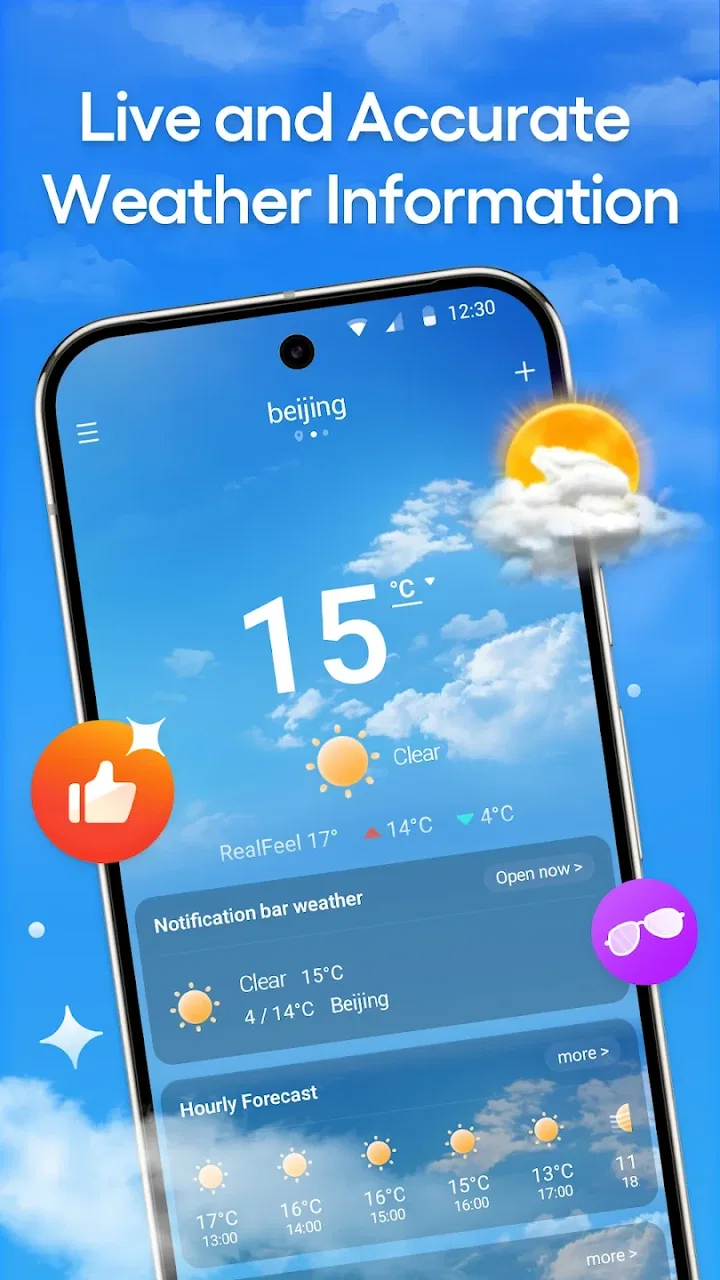
DailyWeather: Weather Forecast provides real-time weather updates, detailed 7-day forecasts, and customizable weather alerts. It also features interactive radar maps, severe weather warnings, and a clean, user-friendly interface. Users can personalize their experience by selecting specific weather details based on their preferences, ensuring they get the most relevant information.
02Is DailyWeather: Weather Forecast free to use?
Yes, DailyWeather: Weather Forecast is free to download and use. However, it offers in-app purchases or a premium subscription for advanced features, such as ad-free usage, extended forecasts, and more detailed weather data. These options provide an enhanced experience for users who need more comprehensive weather insights.
03How accurate is the weather data in DailyWeather: Weather Forecast?
The app sources its data from reliable meteorological providers and uses advanced algorithms to ensure accuracy. It offers real-time updates and uses a combination of satellite data, weather stations, and radar to provide precise forecasts. However, like all weather apps, occasional discrepancies can occur due to rapidly changing weather conditions.
04Does DailyWeather: Weather Forecast support multiple locations?
Yes, DailyWeather: Weather Forecast allows users to track weather conditions in multiple locations. You can easily add and switch between different cities or regions, making it ideal for travelers or those with family in different areas. This feature ensures you stay informed about the weather wherever you go.
05What platforms is DailyWeather: Weather Forecast available on?
DailyWeather: Weather Forecast is available on both Android and iOS platforms. It is optimized for smartphones and tablets, providing a seamless experience across devices. Users can download it from the Google Play Store for Android devices and the Apple App Store for iOS devices.
Pros
- Accurate real-time weather updates.
- User-friendly interface and design.
- Supports multiple locations tracking.
- Customizable weather alerts.
- Detailed forecasts for 10+ days ahead.
Cons
- Ads can be intrusive at times.
- Requires internet for full functionality.
- Limited offline features.
- Occasional location detection issues.
- Premium features locked behind paywall.

DailyWeather: Weather Forecast
Gallery